
Compare
TubeBuddy vs vidIQ 2026: Which Is Better?
TubeBuddy vs vidIQ, measured on fresh accounts: what each free plan really gives you, where TubeBuddy's Keyword Explorer locks, and which to start with.
Note: re-verified on 2026-08-27 on a fresh account. Pricing, plan names and free-plan limits below were measured in-product, not taken from marketing pages.
The difference that decides it is not price — it is what you can do before paying. TubeBuddy is the cheaper tool: Pro is $15/month against vidIQ Boost's $19. But on TubeBuddy's free Starter tier, Keyword Explorer runs for a handful of searches and then locks completely, and you cannot reach the product at all without linking a channel and installing a browser extension. vidIQ's free plan gives 150 credits a month, with keyword searches unlimited and costing nothing.
So you pay less for TubeBuddy and test less of it. We measured both on fresh accounts on 27 August 2026.
Quick verdict: start with vidIQ if you want to try the workflow before paying — 150 credits a month buys roughly 15 video unlocks at 8 credits each, or 3 title rewrites at 50. Choose TubeBuddy if you already know you want a structured optimization toolkit and are ready to pay for it, because that is where its value sits: its free tier is a trial of the interface, not of the tool.
If you want the standalone first-experience write-ups first, see TubeBuddy Review 2026 and vidIQ Review 2026.
Want to test before paying? vidIQ's free plan is the one that lets you: 150 credits a month, and keyword searches cost none of them.
Disclosure: This page may contain affiliate links. If you choose a tool through those links, CreatorIntelHQ may earn a commission at no extra cost to you. Comparisons are written to focus on practical fit, workflow value, and real creator use.
Based on hands-on testing · How we test creator tools
Quick Comparison
| Feature | TubeBuddy | vidIQ |
|---|---|---|
| Free keyword research |
Deeper
Full competition breakdown and a ranked list of who currently owns the results. |
Lasts longer
Unlimited searches costing no credits, but only three related keywords each. |
| What the free plan does |
Runs out
A handful of searches, then Keyword Explorer locks entirely. |
Permanent, capped
150 AI credits a month and 3 ideas a day, kept indefinitely. |
| Getting started |
Three steps
Link a channel, install the extension, then work inside YouTube Studio. |
Best
Usable from its own dashboard on first run. |
| AI ideas and planning |
Yes
Recommendations and growth opportunities, less direct to explore. |
Best
AI prompts plus follow-up chat against your channel context. |
| Optimizing existing videos |
Mostly locked
Retention analysis and the deeper paths needed an upgrade during testing. |
Best
Optimize lists your existing videos and starts on free credits. |
| Depth of toolkit |
Best
Analytics, ranking, retention, competitor scorecards, title and thumbnail workflows. |
Narrower
Research, ideas and optimization rather than a full system. |
| Upgrade clarity |
Harder to read
Locked features scattered across several areas. |
Best
Free and paid tiers legible from the dashboard and pricing screen. |
| Free plan ceiling |
A few searches
The free tier is badged Starter. Keyword Explorer runs, then locks: "This feature is available only on Pro, Star, Legend and Enterprise plans." Measured 2026-08-27. |
150 credits a month
Refreshing monthly, not daily. A video unlock costs 8, a title or thumbnail rewrite 50 — so about 15 video unlocks, or 3 rewrites. Measured 2026-08-27. |
| Keyword data on the free plan |
Full depth while it lasts
On our tested query: overall score, search volume, competition, optimization strength, the complete top-20 ranked results and a channel-share breakdown. No blur, no upsell inside that flow. |
Headline metrics, capped list
Score, search volume, competition and views-per-hour are all unlocked. Searches are unlimited and cost no credits, but only 3 related keywords show — the gate names what it withholds ("164 more related keywords"). |
| Where the tool runs |
Inside YouTube Studio
The browser extension is required, not optional — in TubeBuddy's own web app Keyword Explorer is greyed out with an "Extension Required" badge. The web app also shows nothing until you link a channel. |
Its own web app
We reached and used the free-plan tools in vidIQ's web app directly. (We did not test vidIQ's browser extension, so this row is not a claim about it.) |
| Top consumer tier |
Legend — $32.99/month
Or $26.39/month on annual billing ($316.68/year). Adds bulk processing and advanced reporting. |
Max — $49/month
Billed monthly, or $39/month on annual billing ($468/year). Adds 6,000 AI credits a month (Boost has 2,000). |
| Entry paid plan |
$12/month on annual billing
On annual billing ($144/year), or $15/month billed monthly. Pro unlocks the core SEO toolkit and Keyword Explorer. |
$19/month
Or $16.58/month billed annually ($199/year) for Boost. |
Best Choice By Creator Need
| If your main need is... | Start with... | Why |
|---|---|---|
| You want easier onboarding | vidIQ | It felt cleaner and easier to understand during first use. |
| You want AI idea help | vidIQ | The dashboard surfaced AI prompts, video ideas, and channel context faster. |
| You want to test free features before paying | vidIQ | The free plan gave limited credits to test parts of the workflow. |
| You want a structured YouTube optimization toolkit | TubeBuddy | TubeBuddy felt more like a deeper workflow system for YouTube optimization. |
| You already know you need paid SEO workflows | TubeBuddy or vidIQ | Both may be worth testing once the channel has a repeatable publishing workflow. |
| You want to turn long videos into Shorts | Neither is the best fit | Start with OpusClip Review 2026 or Vizard AI Review 2026. |
The Main Differences Between TubeBuddy and vidIQ
TubeBuddy and vidIQ are two of the most common tools small YouTube creators look at when they want help with ideas, SEO, optimization, and channel growth.
On paper, both tools seem to solve similar problems. They both talk about keywords, optimization, video performance, and creator growth. But after testing both from the perspective of a small creator in the early stages of building a channel, they did not feel the same.
TubeBuddy felt more like a structured optimization and workflow toolkit. vidIQ felt more beginner-friendly, AI-led, and easier to explore on the free plan.
That difference matters because most small creators are not trying to build a complex software stack on day one. They want to know which tool helps them take action faster.
If you want the deeper first-impression write-up focused only on TubeBuddy, read TubeBuddy Review 2026.
Getting Started: vidIQ Is a Web App, TubeBuddy Needs an Extension
The first thing I noticed with vidIQ was how clean and simple the dashboard felt.
After connecting the YouTube channel, vidIQ imported the videos and showed a dashboard with channel context, AI prompts, feed-style suggestions, optimization areas, keywords, and outliers. The interface did not feel confusing. For a small creator, that matters because the first few minutes inside a tool decide whether you want to keep exploring or leave.
vidIQ also made the free plan more visible. It clearly showed that I was on the free plan and gave limited credits to test some features. That made the product easier to understand.
TubeBuddy was also polished, but vidIQ felt easier to use immediately.
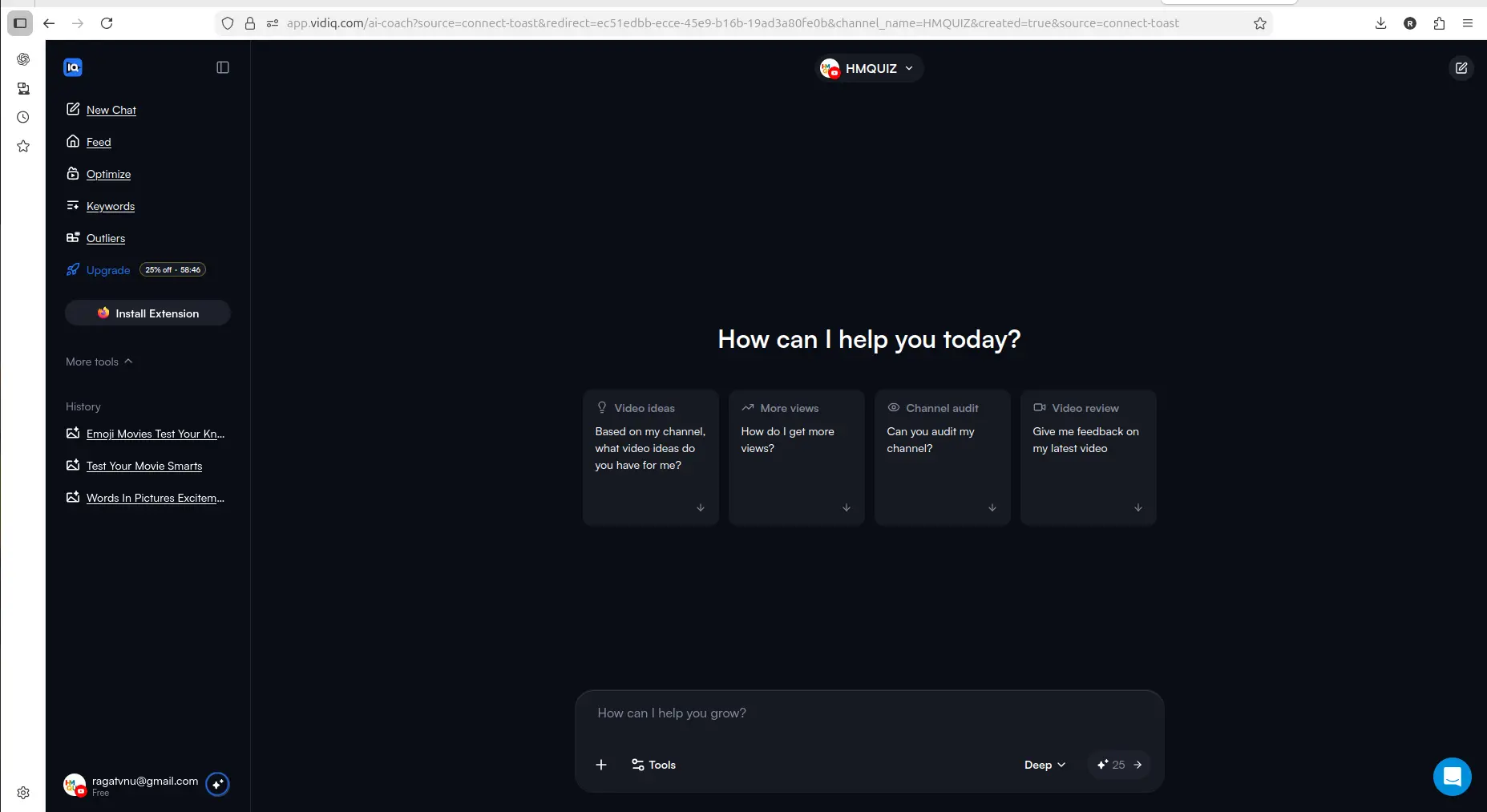
vidIQ felt beginner-friendly because the dashboard immediately offered AI-style prompts like video ideas, channel audit, and feedback.
Free Plans Compared: 150 Credits vs a Locked Keyword Tool
This was one of the biggest differences.
Both free plans have real limits. The useful thing is that they are shaped differently, and that difference decides which one suits you — not a simple "which is better".
vidIQ caps depth, permanently. Re-tested on a fresh account in August 2026: 150 AI credits per month plus 3 video ideas a day, and keyword searches that are unlimited and cost no credits — but each search shows only three related keywords before the rest blur behind an upgrade prompt. Outlier research caps at eight results. You can run keyword research every day for as long as you like; you just never see past the third result.
TubeBuddy gates access, then runs out. Its free tier is called Starter, and getting to the product takes three steps: link a YouTube channel (the web app shows nothing until you do), install the browser extension (Keyword Explorer is disabled without it and displays an "Extension Required" badge), and then run the tool inside YouTube Studio rather than in TubeBuddy's own app.
Get through all that and the data is genuinely good — richer per search than vidIQ's, with a full competition breakdown and a ranked list of who currently owns the results. Then it stops. After a handful of searches an upgrade prompt appears: "Unlock Keyword Explorer! This feature is available only on Pro, Star, Legend and Enterprise plans." Every search after that is blocked. Keyword Explorer is a paid feature that free users sample, not a free feature with a ceiling.
The extension has its own wall too — its Channel Insights panel shows "Upgrade to gain full access", with the full feature set reserved for Legend, the top tier.
So: vidIQ is permanent but capped. TubeBuddy is generous, then gone. If you want to keep doing keyword research indefinitely without paying, that points at vidIQ. If you want the deepest possible look at a handful of keywords before deciding, TubeBuddy shows you more per search.
If your main question is how the free plans compare with the paid side, see what TubeBuddy's free plan allows and vidIQ Free vs Paid.
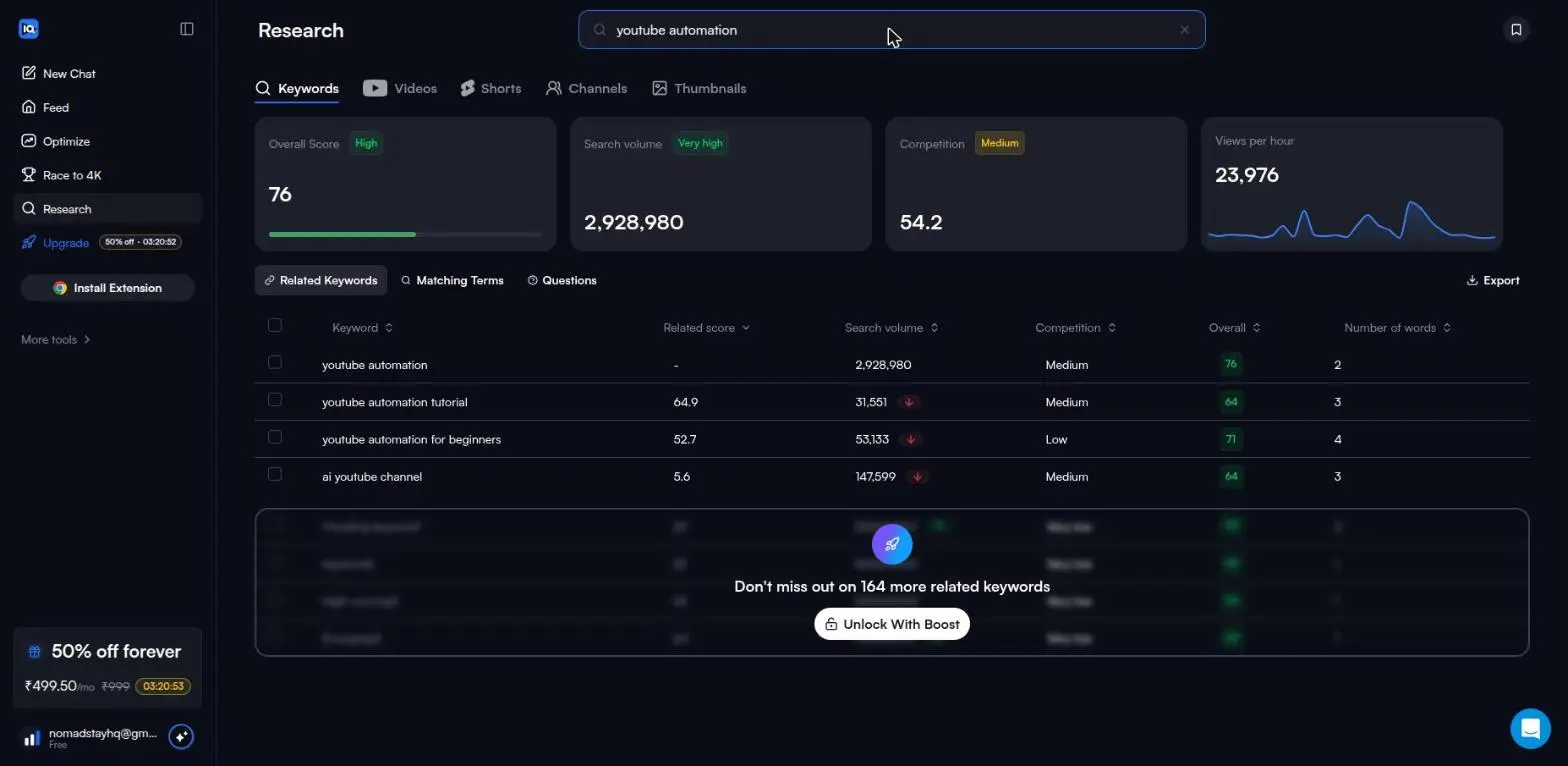
vidIQ's free ceiling is visible and permanent: three related keywords per search, with the count of what is withheld shown on screen. TubeBuddy's ceiling is a number of searches, after which the tool closes entirely. Captured August 2026.
Every free plan runs out somewhere. Know where first.
The Free-Plan Reality Check: what OpusClip, Vizard AI, Submagic and Quso.ai actually let you do for $0 - from real signups, real uploads and real paywall hits.
How Accurate Is the Keyword Data?
Let me be straight about what this question can and cannot be answered with. Neither tool publishes where its search-volume figures come from, and there is no public ground truth for YouTube search volume to check them against — YouTube does not release it. So nobody comparing these two, us included, can tell you which number is correct. Anyone who says otherwise is guessing.
What can be checked is what each tool shows you, and whether its own numbers are internally consistent. Both were measured on fresh accounts on 27 August 2026.
TubeBuddy shows more per search. On the tested query
(youtube automation) the free Starter tier returned an
overall score of 12/100, search volume of 3.00K monthly, unweighted
competition of 3.23M videos, optimization strength, the complete ranked
top-20, a 90% exact-title-match rate across those results, and a
channel-share breakdown showing 13 channels owning all 17 top results.
No blur and no upgrade prompt anywhere in that flow. That last figure —
who already owns the results — is the one most likely to change your
mind about a keyword, and vidIQ did not show us an equivalent.
vidIQ shows less per search but keeps working. Its headline metrics are unlocked on the free plan: overall score, search volume, competition, and views per hour. The cap is on breadth, not depth — three related keywords per search, with the gate naming what it is withholding ("164 more related keywords"). Searches themselves are unlimited and cost no credits.
One inconsistency we did find, and it is vidIQ's. Its in-app table states that free accounts get 6 outlier results. The actual gate is 8, on both browse and a real search. That is in the user's favour, and it is small — but it is a reminder that a tool's own description of its limits is not evidence, which is why we measure them instead of quoting them.
The practical answer: if you want the deepest single-query picture for free, TubeBuddy gives it — until Keyword Explorer locks. If you want to run many queries over weeks without hitting a wall, vidIQ does that. Neither is demonstrably more accurate; they are gated differently.
AI Ideas: What 150 Credits Actually Buys
For idea generation, vidIQ felt clearly stronger.
The dashboard included AI-style prompts such as asking for YouTube ideas, getting more views, auditing the channel, and reviewing videos. This made the tool feel more conversational and easier to use when I was not sure what to do next.
I liked that vidIQ combined automated suggestions with AI chat. It was not only showing ideas; it also gave a way to ask follow-up questions around the channel and the suggestions.
TubeBuddy also showed recommendations and growth opportunities, but vidIQ felt more direct for idea exploration.
For a small creator, this is important. Sometimes the biggest problem is not editing or uploading. It is deciding what to make next.
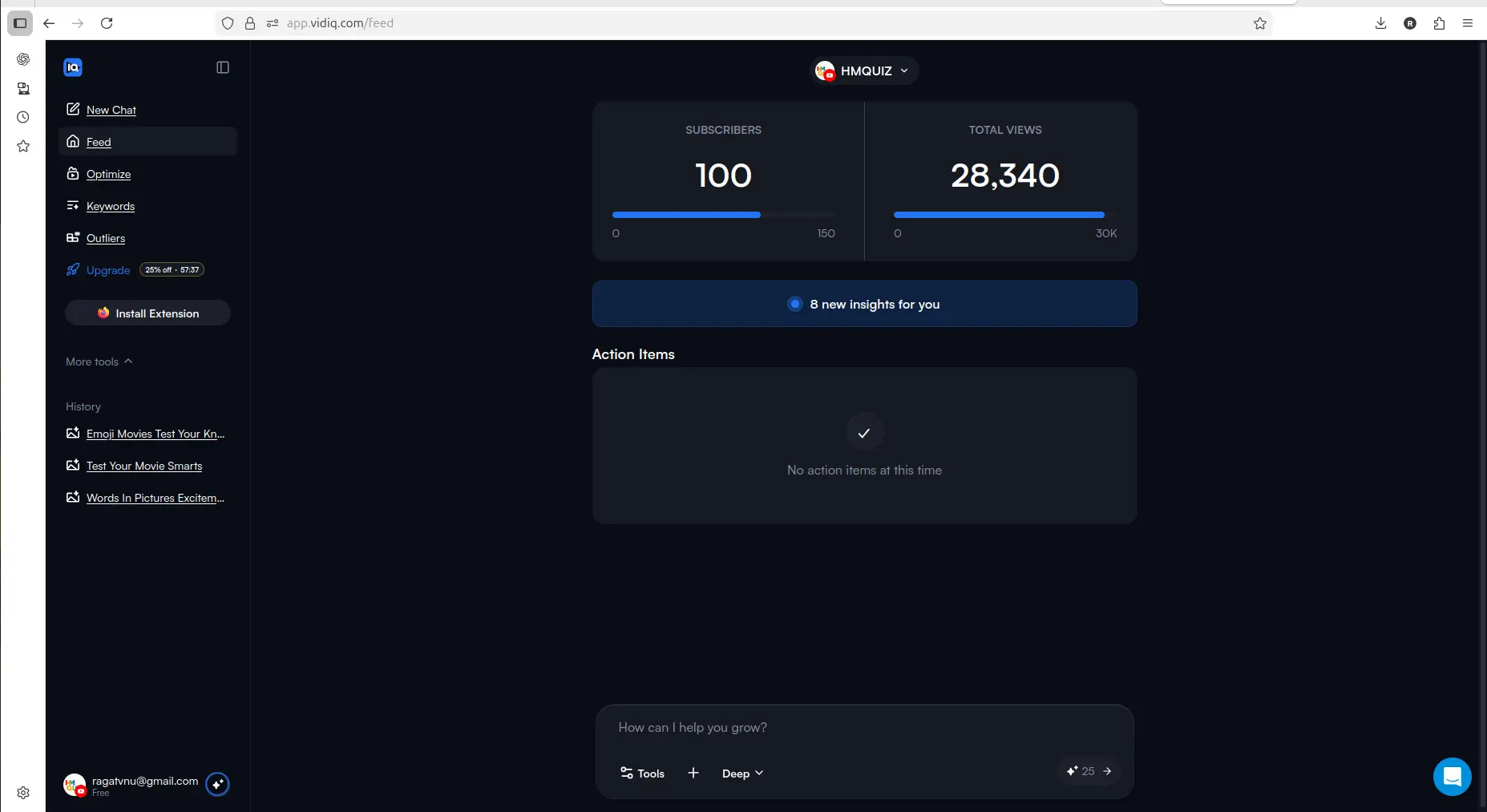
vidIQ connects channel context with suggested action items, which makes the product feel easier to use early.
Optimizing Existing Videos: 8 Credits per Unlock
Both tools point toward optimizing existing videos.
TubeBuddy has useful-looking analytics and optimization features, including deeper tools like retention analysis, but some of the stronger paths appeared locked during testing. That made it harder to judge the full value without upgrading.
vidIQ showed existing channel videos inside its Optimize section and gave a clearer way to start improving them with limited credits. That is not perfect, because credits can run out quickly if you have many videos. But it still gave a more practical free test of the optimization workflow.
For small creators with older videos, that matters. Many channels already have content published but do not know which videos need attention first.
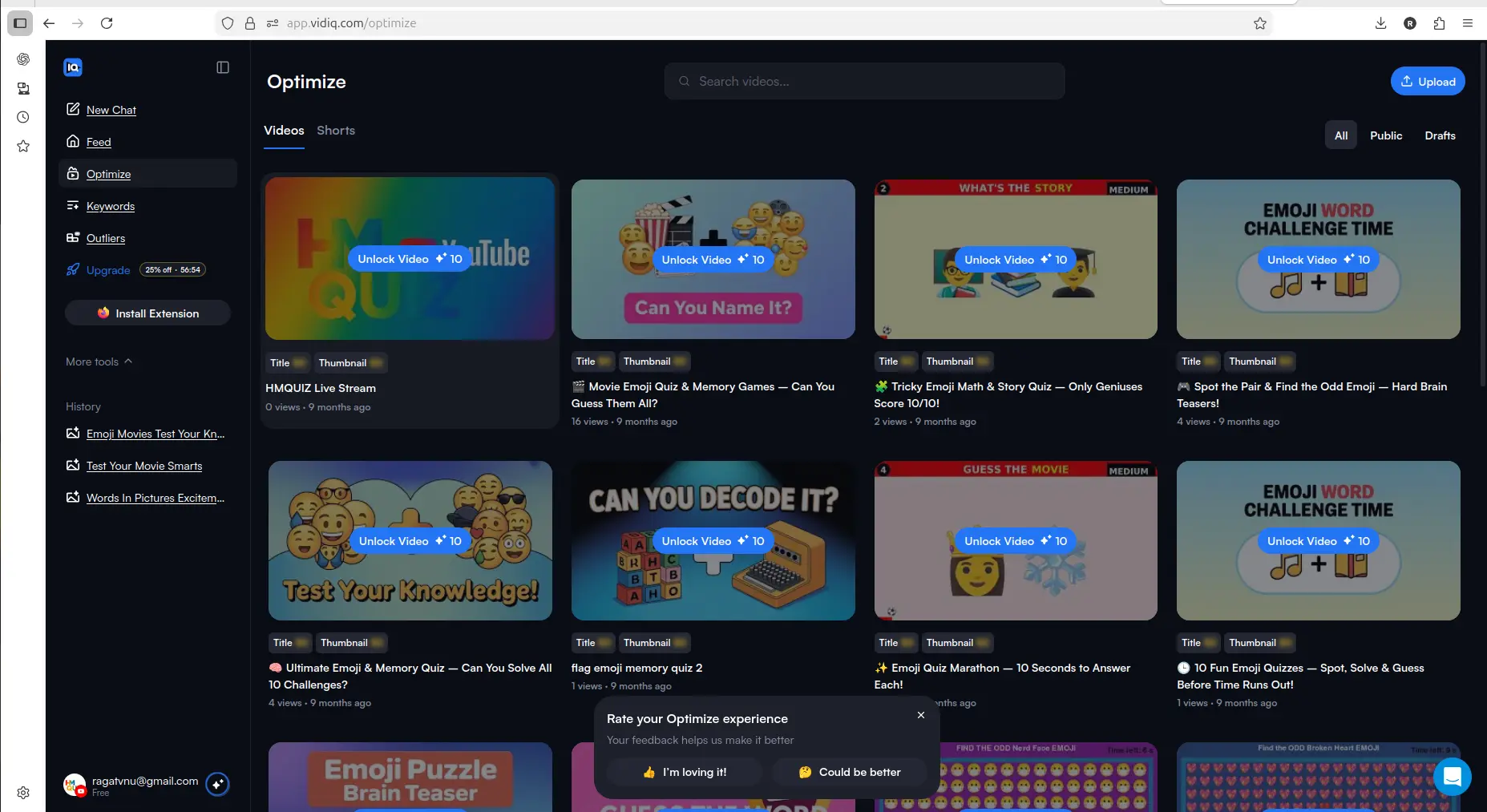
vidIQ's Optimize section made it easier to see existing videos that could be improved, even though credits limit how much you can do for free.
What TubeBuddy Does Better: a Structured Toolkit
TubeBuddy should not be dismissed.
Compared with vidIQ, TubeBuddy felt more like a structured YouTube workflow system. Its dashboard gave a serious first impression, and the platform surfaced tools around analytics, ranking, retention, competitor scorecards, title and thumbnail workflows, and broader optimization.
The issue is that many of the more interesting TubeBuddy paths seemed to become useful only after upgrading or installing the extension. That made it feel less generous as a free starting point.
So my view is this: TubeBuddy may still be strong for creators who already know they want a deeper optimization toolkit. But for a small creator trying to test value before paying, vidIQ felt easier to evaluate.
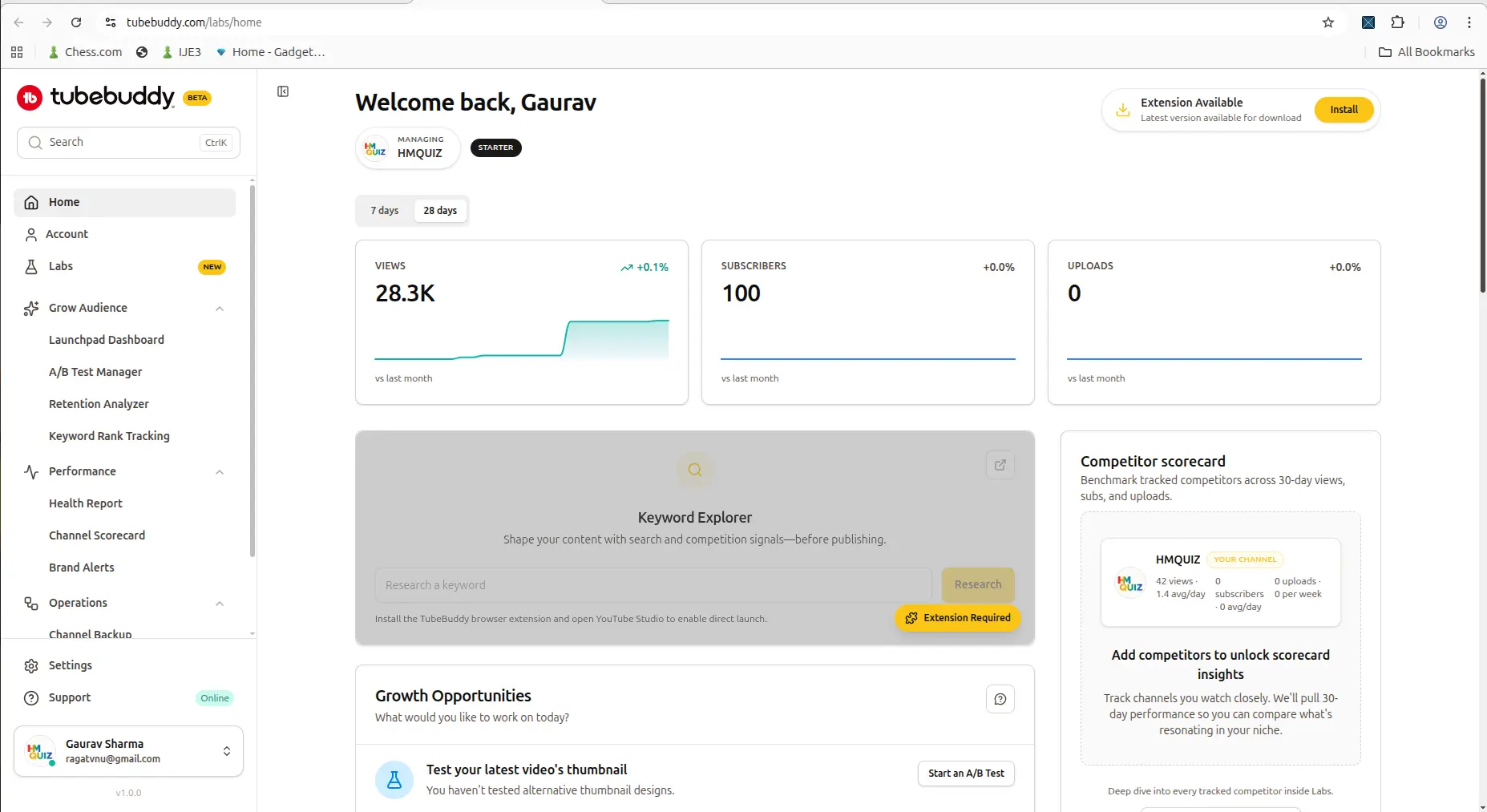
TubeBuddy feels more like a structured optimization toolkit, but its deeper workflows were harder to test freely.
Where Each Tool Stops You and Asks for Money
Both tools push users toward paid plans.
TubeBuddy showed multiple locked features and upgrade prompts across different areas. That made the free experience feel more restricted as I explored deeper workflows.
vidIQ also had upgrade pressure, especially around Boost features, outliers, keyword access, and unlimited usage. But the upgrade path felt clearer because the free plan and paid plans were easier to understand from the dashboard and pricing screen. If you are weighing the paid tiers, we track what both tools currently charge alongside the other four we test.
One detail I noticed: vidIQ showed pricing in local currency during my test, while TubeBuddy appeared more dollar-based. For creators outside the US, that can make vidIQ feel easier to evaluate financially.
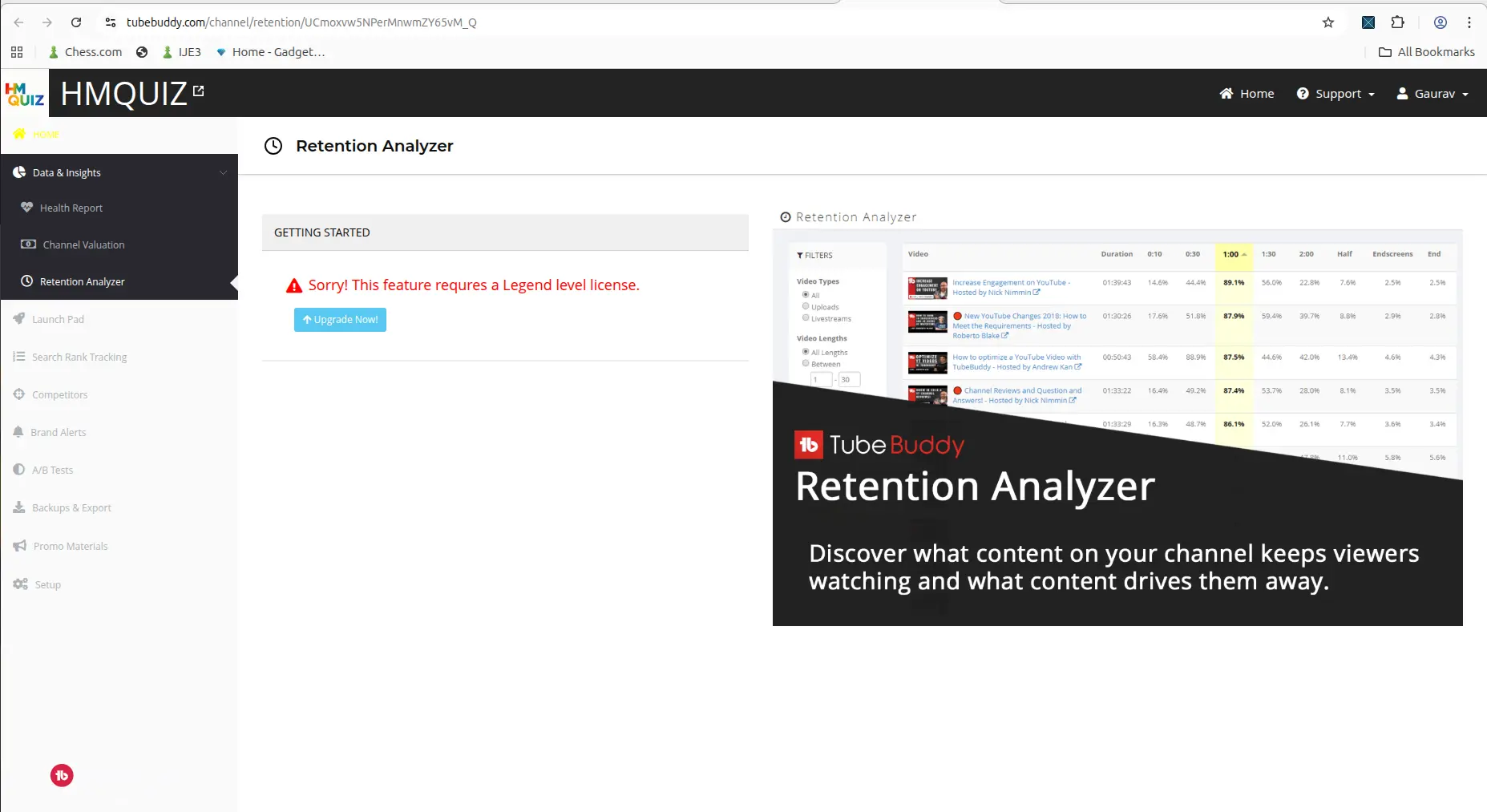
TubeBuddy showed serious-looking workflows, but some of the stronger features were locked behind higher-tier access.
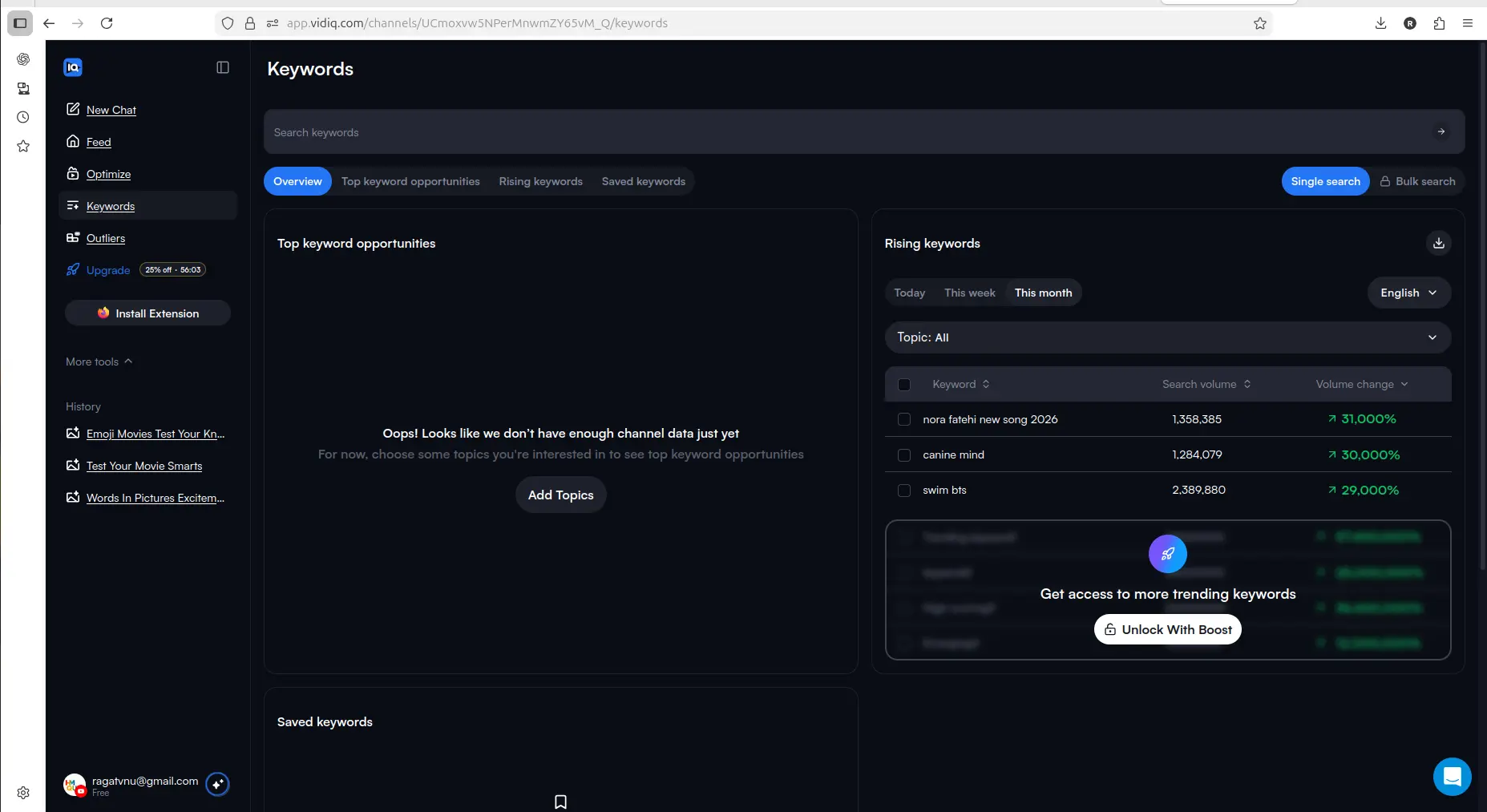
vidIQ also gates deeper keyword access, but the free-to-paid path felt easier to understand during testing.
Pricing and Paid Plans
Understanding the actual cost difference helps before committing to either tool.
vidIQ pricing (as of 2026):
- Free — 150 AI credits per month plus 3 video ideas per day, unlimited keyword searches showing 3 related results each, outliers capped at 8 per search
- Boost — $16.58/month on annual billing ($199/year), or $19/month billed monthly, unlocks 2,000 AI credits a month, full keyword data, unlimited trends research and subscriber insights, and AI optimization
- Boost 1-on-1 Coaching (we previously called this "Coaching + Boost") — $99/month on annual billing ($1,188/year), or $199/month billed monthly, adds one-on-one YouTube coaching and a custom growth plan. vidIQ lists this in its pricing FAQ rather than as a card in the main lineup
- Max — $49/month billed monthly, or $39/month on annual billing ($468/year), adds 6,000 AI credits a month, a stronger "Max Mode" AI and up to 11 hours of short-clip generation
TubeBuddy pricing (as of 2026):
- Free — basic SEO tools, limited keyword access
- Pro — $15/month billed monthly, or $12/month on annual billing ($144/year), unlocks core SEO toolkit, keyword explorer, and most optimization tools
- Legend — $32.99/month billed monthly, or $26.39/month on annual billing ($316.68/year), adds bulk processing, advanced reporting, and features for larger channels
- Enterprise is a custom-priced card on the public pricing page. Star no longer appears as a purchasable tier, surviving only in the licence footnote
- These are TubeBuddy's US prices, read 2026-09-21. It shows different pricing in some other countries, so check your own total at checkout
TubeBuddy dropped its Star tier during 2026, and the old 50% discount for channels under 1,000 subscribers no longer appears on the pricing page. Pro is $15/month for everyone, or $12/month on annual billing.
On price the two are closer than they look: TubeBuddy Pro is $15/month against vidIQ Boost's $19, and $12/month against $16.58 on annual billing. TubeBuddy is cheaper, but not dramatically. However, vidIQ's free plan gave more practical testing access in my experience, making it easier to understand the product's value before paying.
The important point is not that the free plan is enough forever. It is not.
The important point is that vidIQ gives a clearer path from testing to upgrading. You can try parts of the workflow, see whether it fits your channel, and then decide whether the paid plan makes sense.
TubeBuddy's Pro plan is worth considering once you are ready to pay, though at $15/month it is only modestly cheaper than vidIQ Boost.
Which Tool Is Better For Small Creators?
If I had to choose one tool to start with as a small creator, I would start with vidIQ.
The reason is simple: vidIQ felt easier to use, clearer on the free plan, and more helpful for idea generation. It gave me limited credits to test the workflow before paying. That made it easier to understand the product's value.
TubeBuddy still looks useful, especially for creators who want a more structured optimization toolkit and are ready to pay. The Pro plan at $15/month, or $12/month annually, undercuts vidIQ Boost by a modest margin. But based on my testing, vidIQ felt like the better first step for a small creator who wants to explore ideas, test optimization, and understand the tool before committing.
If you are still deciding whether you need a YouTube growth tool at all, start with the YouTube Tool Match Finder or the Best YouTube Tools for Small Creators page before comparing paid platforms more deeply.
If your main workflow problem is turning existing long videos into Shorts rather than researching ideas or YouTube SEO, our OpusClip Review 2026 is a better next read.
Final Verdict: TubeBuddy vs vidIQ
TubeBuddy and vidIQ are not the same kind of experience.
Neither tool is mainly built for repurposing long videos into Shorts, so if that is your main workflow need, read our OpusClip Review 2026.
TubeBuddy feels more like a structured YouTube workflow and optimization system. It shows serious tools, but more of the useful depth appears tied to paid features. Its Pro plan at $15/month is the cheaper paid entry point, though only slightly, and drops to $12/month on annual billing ($144/year).
vidIQ feels more beginner-friendly and AI-assisted. It gives a cleaner starting experience, more useful free testing, and stronger idea support. Boost starts at $19/month billed monthly, or $16.58/month on annual billing, which is higher than TubeBuddy Pro, but the free plan gave more working access before committing.
For small creators still in early growth, I would start with vidIQ first. Then, once the channel workflow becomes more structured and optimization becomes a bigger need, TubeBuddy may still be worth testing — especially at the Pro tier price.
My practical verdict:
- choose vidIQ first if you want easier onboarding, AI idea help, and a more useful free test
- choose TubeBuddy Pro if you want the structured toolkit and are ready to pay — $15/month, or $12/month on annual billing
- compare both if you are already serious about YouTube SEO, packaging, and video optimization
Starting with vidIQ, as this comparison recommends? The free plan is 150 AI credits a month, and keyword searches are unlimited and cost nothing — you can test the workflow on your own channel before deciding between the two.
Related Pages
More on vidIQ
- vidIQ Review 2026 — the full hands-on walkthrough: AI prompts, Optimize, Keywords and Outliers on a connected channel
- vidIQ Free Plan — 150 credits a month, and the 50-credit action that ends most free plans
More on TubeBuddy
- TubeBuddy Review 2026 — Keyword Explorer tested to the search where it walls, and what it returns before that
If optimization is not your bottleneck
- OpusClip Review 2026 — for turning long videos into Shorts rather than optimizing the ones you have
- AI Subtitle Tools for YouTube Creators — captions and burned-in subtitles, tested across four tools
Wider guides
FAQ
Is vidIQ better than TubeBuddy?
For small creators starting for free, vidIQ felt easier to use and more useful in my testing because it gave limited credits to test ideas, SEO, and optimization workflows before paying. TubeBuddy still looks useful for creators who want a more structured YouTube optimization toolkit, and its Pro plan at $15/month is modestly cheaper than vidIQ Boost once you are ready to pay.
Is TubeBuddy better than vidIQ?
TubeBuddy may be better if you already know you want a structured YouTube optimization workflow and are ready to evaluate paid features. Its Pro plan starts at $15/month, a little below vidIQ Boost's $19. In my free-side testing, however, more of TubeBuddy's deeper value appeared tied to paid access or extension-based workflows.
Which tool has the better free plan, TubeBuddy or vidIQ?
Based on my testing, vidIQ had the more useful free starting point. It showed limited credits, ideas, keyword research, and optimization-related access. TubeBuddy gave a strong preview, but more useful-looking paths led to license walls or extension requirements.
Which tool is better for small YouTubers?
For most small YouTubers, I would start with vidIQ because it felt easier to explore, clearer on the free plan, and stronger for idea generation. TubeBuddy is still worth testing later if you want a deeper YouTube optimization toolkit, especially at the Pro tier price point.
Which tool is better for keyword research?
Both tools offer keyword and optimization features, but vidIQ felt easier to test from the free side. TubeBuddy's Keyword Explorer becomes more useful at the Pro plan, which starts at $15/month, and above, especially for creators who want to track keyword trends over time.
Should I use both TubeBuddy and vidIQ?
Most small creators should not try to master both tools at the beginning. Start with one tool, test whether it improves your video ideas or optimization workflow, and only compare both later if your channel has a repeatable publishing process.
Are TubeBuddy and vidIQ good for making YouTube Shorts?
TubeBuddy and vidIQ are better suited for YouTube ideas, SEO, optimization, and channel research. If your main goal is turning long videos into Shorts, tools like OpusClip, Vizard AI, or other AI video repurposing tools are a better fit.
How much does vidIQ cost?
vidIQ offers a free plan with limited credits. The Boost plan costs $16.58/month with annual billing and unlocks 2,000 AI credits a month, full keyword research, unlimited trends research and subscriber insights, and AI optimization. The Boost 1-on-1 Coaching plan costs $199/month billed monthly, or $99/month on annual billing ($1,188/year), and adds one-on-one YouTube mentorship.
How much does TubeBuddy cost?
TubeBuddy's free tier is called Starter. The Pro plan costs $15/month, or $12/month on annual billing ($144/year), and unlocks the core SEO toolkit and keyword explorer. The Legend plan costs $32.99/month, or $26.39/month on annual billing ($316.68/year), and adds bulk processing and advanced reporting. TubeBuddy describes the $144 annual charge as a "one-time payment" — it buys one year, not permanent access. The public pricing page shows Pro, Legend and a custom-priced Enterprise card; Star is no longer a purchasable tier. The old sub-1,000-subscriber discount no longer appears. These are US prices, read 2026-09-21; TubeBuddy shows different pricing in some other countries.