
Auto-Caption Videos With n8n and Submagic
Disclosure: CreatorIntelHQ may earn a commission if you buy through some links. This page is based on hands-on testing and documented observations.
⚠️ Can You Get a Watermark-Free Submagic Export for Free?
Yes — through Submagic's API, and this free n8n workflow does it for you. It takes a video URL, sends it to Submagic, waits for the render, and hands back a download link to a captioned file.
We built it and ran it on 22 September 2026, downloaded the output and inspected it frame by frame: 1080×608, 90 seconds, captions burned in, and no watermark anywhere in the file. Submagic's editor refuses to export at all on a free account — this route does not.
The allowance is small but real: 10 API credits a month on the trial, at one credit per minute of video, so roughly two 90-second clips.
Two things will trip you up, and neither is in the documentation: the REST API rejects the Authorization: Bearer header that Submagic's own setup snippet shows, and adding an export step re-renders the project and charges you twice.
Based on hands-on testing · How we test creator tools
Get the workflow
Get the n8n workflow
The six-node workflow we built and ran on 22 September 2026, exported from n8n and ready to import. Includes the two fixes that are not in Submagic's documentation.
The workflow is free. Tell us where to send it and the file comes straight back — then in n8n: Workflow menu (…) → Import → From file.
What it does
Six nodes, one job:
- Configure — you set the video URL, a title, and the language
- Create project —
POST https://api.submagic.co/v1/projects - Wait 30s
- Check status —
GET https://api.submagic.co/v1/projects/{id} - Render finished? — if
statusiscompleted, continue; otherwise loop back to the wait - Captioned video ready — outputs
downloadUrl,directUrlandprojectId
The loop matters. Our 90-second clip took about three minutes end to end, and it polled twice before the render was ready. A fixed delay works until the day you feed it a longer video, then it fails silently.
We ran this exact template again on 4 October 2026, this time on self-hosted n8n: 66.6 seconds end to end. Sixty of those seconds were the two wait steps; n8n's own work — creating the project and two status checks — took about 6.5 seconds. The render time is Submagic's, not n8n's.
Setup
You need: an n8n instance (Cloud's trial is fine), a Submagic account, and a publicly reachable URL for the video you want captioned.
Want your own n8n instead of Cloud? We deployed n8n with a Postgres database on Railway from the command line: about 40 seconds from the deploy command to a working instance. Railway bills for what the services use, around the clock — idle, our n8n held about 632 MB of memory and Postgres 144 MB.
Affiliate link: we may earn a commission if you sign up and pay. Railway says referred sign-ups get $20 in credits.
No Submagic account yet? The trial issues an API key immediately, with no card and no upgrade step — that is the account this whole guide was tested on. You need your own key: workflow templates never carry anyone else's credentials.
- Import the workflow.
- Open Create project, and under Header Auth choose Create new credential.
- Set Name to
x-api-keyand Value to your Submagic API key — generate one at API & Integrations in the Submagic dashboard. Save. - Open Check status and select the same credential from the dropdown. It does not inherit, and this is the single most likely reason your first run fails.
- Put your video URL in the Configure node and run it.
The auth gotcha
Submagic's dashboard hands you a setup snippet using
Authorization: Bearer <key>. That header works on
their MCP endpoint. On the REST API it returns
UNAUTHORIZED. The REST API wants
x-api-key.
We only found this by trying both. If you build against the documentation you will get a 401 with nothing to tell you why, which is exactly the kind of wall that makes people give up on an API that actually works fine.
What it actually costs
Submagic meters API use separately from the credits you see in the app — a detail worth knowing, because watching the wrong counter tells you nothing. Their API & Integrations page states the rule plainly:
Each minute of video processing consumes 1 credit. Upon exceeding this limit, your API access will be suspended until the next month.
On the trial that is 10 credits a month. Our 90-second clip cost 2 — ninety seconds rounds up to two minutes. So the practical ceiling is about two clips of that length per month, or ten minutes of video however you slice it.
The dashboard credit balance in the main app does not move when you run this. It is a different ledger. We watched it sit unchanged at 12 through a render that definitely happened.
⚠️ Do not add an export node. Submagic's
POST /projects renders automatically once transcription
finishes. Calling the export endpoint afterwards re-renders a project
that is already done and charges you for it twice. Just poll
GET /projects/{id} until downloadUrl appears,
which is what the workflow does.
The part that surprised us
On a Submagic trial account, the web editor will not let you export at all. Click Export and you get a modal reading "Your video's ready — upgrade to export," which loops into a referral offer and back again with no path to a file.
The API, on the same account, on the same day, rendered the clip and returned a working download link. Afterwards the editor showed that project badged "Exported" and offered Download and Publish — the same buttons it had refused minutes earlier on the project beside it.
We documented that in full, with screenshots, in does Submagic add a watermark. It is worth reading before you build anything that depends on this, because a vendor whose two surfaces disagree about your entitlements may change one of them.
Is the output watermarked?
No. We downloaded the file this workflow produced and checked.
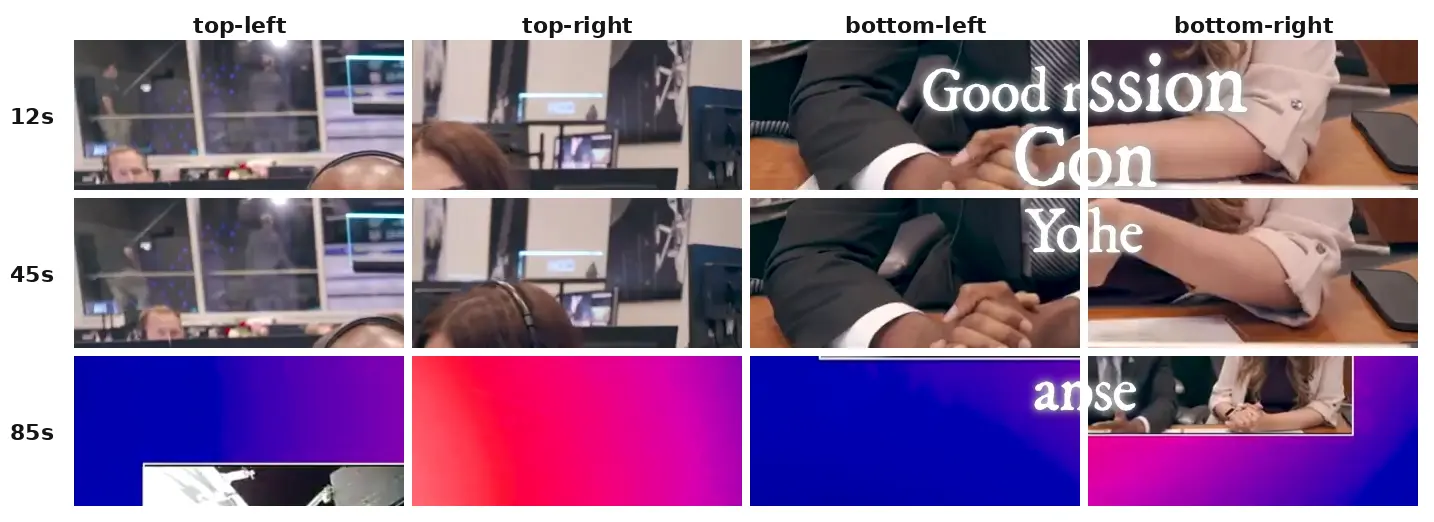
All four corners of the workflow's output, cropped at full resolution rather than scaled down. No Submagic logo, wordmark or bug. The visible text is the burned-in caption; the NASA branding came with our public-domain test footage.
The file itself: 16MB, 1080×608, 90.0 seconds, H.264 video with AAC audio. Captions are composited into the frames, which is what you want — they travel with the file wherever you upload it.
Limits worth knowing before you build on this
- The video URL must be publicly reachable. Google Drive sharing links work. YouTube URLs do not — those need a different Submagic endpoint entirely.
- Ten minutes a month is a real ceiling. This is enough to prove a pipeline works. It is not enough to run a posting schedule on. If you outgrow it, Submagic's paid plans start at $19/month billed monthly on Starter, and nothing in this workflow changes — the allowance is simply larger.
FAQ
Do I need to pay for Submagic to use this?
No. The trial includes API access with its own 10-credit monthly allowance, which is what we tested on. You will need your own account and your own API key — workflow templates never carry someone else's credentials.
Why doesn't the Bearer token work?
Submagic runs two surfaces. The MCP endpoint takes
Authorization: Bearer; the REST API that n8n calls takes
x-api-key. The setup snippet in the dashboard shows the MCP
form, which is what makes this confusing.
How long does a render take?
About three minutes for a 90-second clip, including download and transcription. The workflow polls every 30 seconds, so it adapts to longer videos on its own.
Can I feed it a YouTube link?
Not with this workflow. Submagic handles YouTube through a separate Magic Clips endpoint that splits a long video into several short ones — a different job with a different output.
Will this work on a paid Submagic plan?
Yes. Nothing here depends on the trial; the allowance is simply larger. The free tier is how we tested it, not a requirement.
Related guides
- Does Submagic add a watermark? — the editor-versus-API finding, with screenshots
- Does Vizard AI add a watermark? — the free-plan mark, checked frame by frame in a downloaded file
- Is Submagic free?
- How to test an AI video tool before paying — the routine we use on every tool here
- Compare AI video repurposing tools — where Submagic sits against OpusClip, Vizard AI and Quso.ai