
Review
OpusClip Watermark: Can You Remove It Free?
OpusClip's free export carries a watermark and there is no free way to remove it. What we saw at Download HD, the options people try, and what removal costs.
Disclosure: CreatorIntelHQ may earn a commission if you buy through some links. This page is based on hands-on testing and documented observations.
This page answers one narrow question: what does OpusClip's watermark actually do to your exports, and what does getting rid of it cost? For the full workflow walkthrough, read our OpusClip review. For the free plan and Pro trial side by side, see is OpusClip free?. For what removing it costs relative to the other tools we test, see our creator tool price comparison.
Based on hands-on testing · How we test creator tools
Can You Remove the OpusClip Watermark Without Paying?
⚠️ Can You Remove the OpusClip Watermark for Free?
No — and we can say that from the file, not the pricing page. The OpusClip logo is composited into the video frames themselves, part of the pixel data rather than an overlay a player draws on top. Nothing for a remover tool to strip.
On 14 September 2026 we exported a clip from the permanent free plan — the 60-credit tier, not the Pro trial — with Download HD, and inspected the MP4 with ffprobe and frame extraction: a real 1080×1920 file, 26.5 seconds, 795 frames. It cost zero credits.
The mark is not on the whole clip. It is absent for roughly the first four seconds, fades in around the five-second mark, and stays to the end — so a very short clip may carry little or no visible branding, while anything of normal Shorts length is marked for most of its runtime. No vendor page mentions this.
Cropping, AI removers and re-encoding each cost you something, covered below. Watermark-free export is paid, starting on the Starter plan at $15/month.
No — not in any way that gives you a clean clip, and we can now say that from the file rather than from the pricing page.
On 14 September 2026 we ran a clip through OpusClip's
permanent free plan (the 60-credit tier, not the Pro
trial), exported it with Download HD, and inspected the
downloaded MP4 with ffprobe and frame extraction. The
export was a clean 1080×1920 file, 26.5 seconds, 795 frames. The
OpusClip logo and wordmark are composited into the video frames
themselves — they are part of the pixel data, not an overlay a
player draws on top. There is no setting, flag, or stream to disable
after the fact, which rules out the entire category of "just strip the
overlay" tools.

A frame pulled straight out of the downloaded file. The mark is in the pixels, not drawn by a player.
One detail worth knowing, because no vendor page mentions it and it changes how the clip reads: the watermark does not cover the whole clip. Sampling frames across the timeline, it is completely absent for roughly the first four seconds — while OpusClip's Auto headline card is on screen — then fades in around the five-second mark and stays to the end. So a very short clip may carry little or no visible mark, while anything of normal Shorts length is branded for most of its runtime.
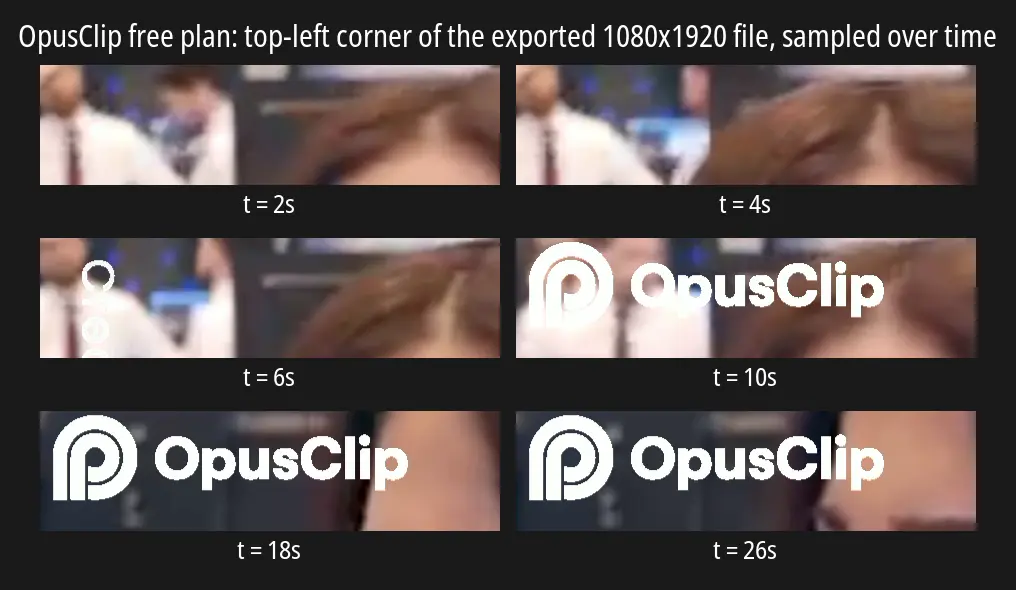
The same corner of the exported file, sampled across the clip. Nothing at 2s and 4s, fading in at 6s, fully branded from 10s to the end.
Two other things we measured on that export: it cost zero credits (the balance was 59 before and after; the single credit went on generation), and the free tier really does render at 1080p, matching OpusClip's published claim.
The routes people try to remove it each cost you something — footage, money, or both:
- Cropping it out — you can crop in a separate editor, but you are cutting part of every frame, shrinking your usable area and risking clipping your subject or captions. If the mark sits near your content, cropping trades one problem for another.
- Third-party watermark removers — they exist, but none we found is free for a full clip. AIAI.com and Vmake preview only the first 3–5 seconds free and charge to export the rest; Quso covers the mark with an overlay rather than removing it. We have not run our export through any of them, so we make no claim about the quality of their output.
- Re-editing or re-encoding — running the file through another editor does not remove a composited mark; it re-exports the same watermark, slightly worse.
The blunt conclusion: there is no reliable free way to get a clean OpusClip export. Treat the free tier as a way to evaluate whether the clipping and reframing suit your footage — which it genuinely is good for, and it does hand you a real 1080p file — rather than a way to produce publishable clips.
Vizard AI's free plan works the same way, and we verified it the same way: see Does Vizard AI add a watermark? for that teardown.
What do you want us to test?
We run tools on real accounts and report what actually happens — free-plan walls, watermarks, the exact moment each one asks for money. Tell us what you need to know and we will reply within 72 hours, either with what we found or with why we cannot test it.
What We Observed vs What Is Documented
This page draws on two different kinds of evidence, and it is worth being clear about which is which.
Observed directly in our testing — the export-step watermark prompt, visible credit consumption, editor access, and the AI Reframe output state. Our test ran on a free trial account that showed 10 credits for 7 days.
Our September 2026 re-test ran on the permanent free plan instead — the tier that actually matters for this question, and one we had never tested before:
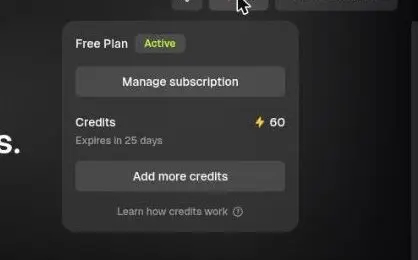
The free-forever tier, not the Pro trial. Pro includes watermark removal, so a trial export could never have answered this.
⚠️ Which route each finding comes from. The April and August sessions ran on a Pro trial, and Pro lists Remove Watermark as an included feature — which is why those sessions could never settle what the free tier produces. The permanent free plan (60 credits a month) was tested separately on 14 September 2026, and that is the session the watermark findings above come from. OpusClip advertises "Has watermark" and "After 3 days, the clips will no longer be exportable" on that tier: we confirmed the watermark ourselves, and saw the export window surface in-product as "2 days left to edit" on the project card. Where a claim below rests on OpusClip's documentation rather than our own testing, it says so.
Taken from OpusClip's published pricing page and help documentation (checked 12 August 2026) — monthly processing minutes per plan, per-tier prices, upload ceilings, and aspect-ratio availability. We have not run a paid OpusClip account, so those numbers are reported as documentation, not as tested facts.
Plan details change often. Check OpusClip's current pricing page before paying.
Where the Watermark Appears
The watermark does not block you from using OpusClip. It blocks you from using the output cleanly.
In our testing the workflow ran normally — upload, AI Reframe to 9:16, processing, and a finished result view showing the vertical clip alongside transcript and scene analysis. Actions including Download HD, Edit clip, AI hook, Enhance speech, and Add B-Roll were all reachable.
⚠️ What happens at Download HD has changed, and we are flagging it rather than smoothing it over.
In April 2026, clicking Download HD triggered an upgrade prompt stating that free and trial users would keep the OpusClip logo on their clips unless they upgraded. We captured it:
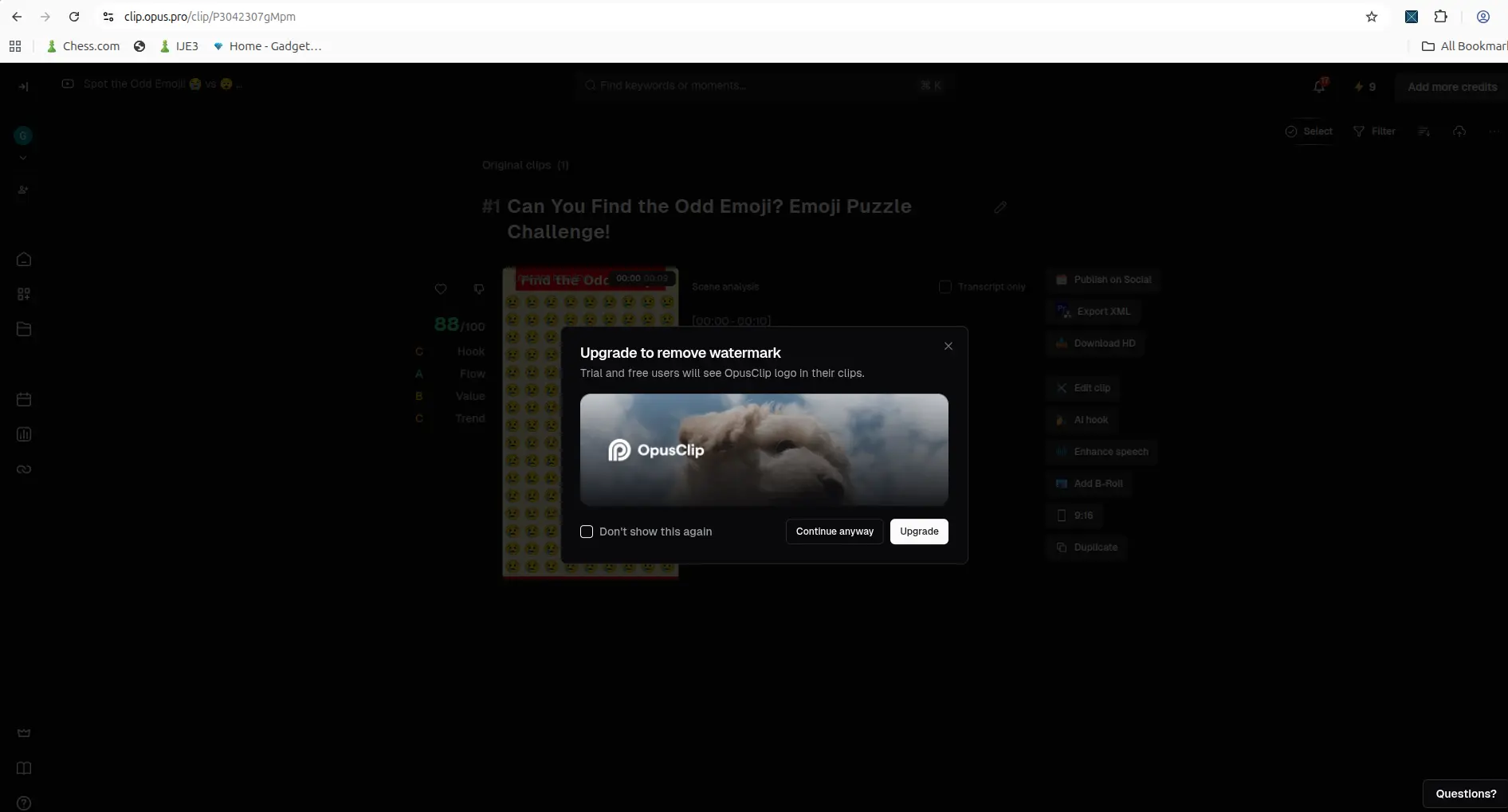
April 2026: the watermark restriction appeared as a prompt at the export step.
We have since re-tested twice — 27 August 2026 and 14 September 2026 — and that prompt no longer appears.
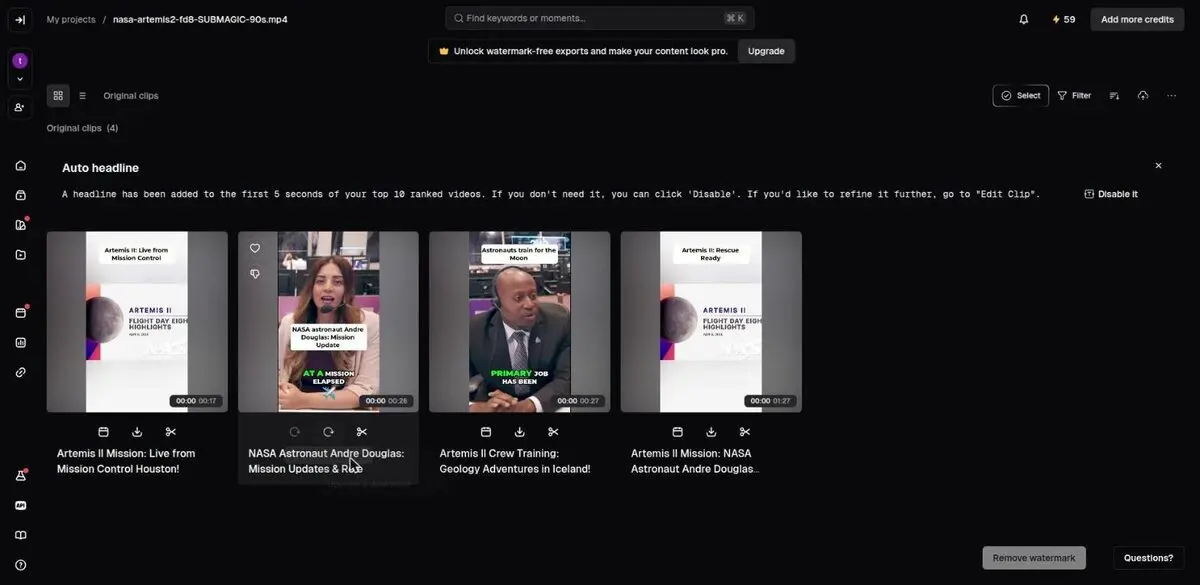
September 2026: the same Download HD click. The clip simply renders — no modal, no paywall. Download HD now renders and serves the file directly, with no modal, no paywall, and no credit charge. The watermark is still applied; OpusClip simply no longer interrupts you to say so. What remains is passive: a standing banner reading "Unlock watermark-free exports and make your content look pro" and a Remove watermark button beside the clip grid.
Practically this is worse for anyone evaluating the tool, not better. You can now validate the entire workflow — captions, reframing, editor — download what looks like a finished 1080p file, and only discover the branding when you open it. The free tier remains genuinely useful for answering "does this fit my process?" and genuinely unsuited to publishing directly.
Export Limits Behind the Watermark
The watermark is one of several export-side constraints. Per OpusClip's published plan documentation (checked 12 August 2026):
| Limit | Free | Starter | Pro |
|---|---|---|---|
| Price | $0 | $15/month | $29/month |
| Processing minutes | 60/month | 150/month | 300/month (or 3,600/year) |
| Watermark on export | Yes | No | No |
| Editing capability | Not included | Included | Included |
| Aspect ratios | Not separately documented | 16:9, 1:1, and 9:16 | |
| Export resolution | Up to 1080p | Highest available | Highest available |
| Upload size | Up to 10GB per video | ||
Two entries deserve a caveat. OpusClip documents the 16:9 / 1:1 / 9:16 range as a Pro feature, which implies narrower options lower down, but it does not spell out exactly what Free and Starter allow — so we have left that cell honest rather than guessing. And "highest resolution available" is OpusClip's own wording for paid tiers, not a specific number.
What Removing the Watermark Costs
Watermark-free export is the headline difference between the free tier and the cheapest paid tier. On OpusClip's published pricing, that is $15/month on Starter, which also adds editing capability and raises processing minutes from 60 to 150 per month.
That framing is more useful than the price alone. If the watermark is your only blocker, Starter is the relevant number. If you are also running out of processing minutes — 60 minutes of source video per month goes quickly if you upload full-length videos rather than pre-trimmed segments — then the minutes increase matters as much as the clean export.
How This Compares to Vizard AI
Vizard AI applies the same basic model: a watermark on free downloads, removal gated behind a paid tier. We tested Vizard's free plan directly and documented exactly where its watermark lands in Does Vizard AI add a watermark?.
We have now inspected an exported file from both, and the mechanism is the same in each: the mark is composited into the frames, so neither can be cleaned up afterwards. Two differences we measured rather than read off a pricing page. Vizard caps free export at 720p; OpusClip gave us a full 1080p file. And Vizard's mark runs the whole clip, where OpusClip's is absent for the first few seconds before fading in — so on a very short clip OpusClip is the less branded of the two.
Beyond the watermark, Vizard's free plan deletes stored videos after 3 days and gives 60 credits a month; OpusClip's gives 60 processing minutes a month and, in our test, showed "2 days left to edit" on the project. If you want to weigh both free tiers side by side before paying, our Vizard AI vs OpusClip free plan comparison covers that directly.
The other two tools we test the same way make you work harder for a
file. Quso.ai blocks clip generation outright on its free plan, so
nothing is ever rendered for a watermark to sit on — see what Quso.ai's free plan actually
blocks. Submagic's editor refuses to export, returning "upgrade to
export" at the download step, but its API will render a
clip on a separate allowance of 10 API minutes, and that file comes back with no
watermark on it at all — we checked it frame by frame on 22
September 2026. That allowance is issued at signup, not earned: we
confirmed it on a second trial account on 24 September 2026, untouched,
before an API key had been generated. Submagic lists the two balances
separately in its own account screen (Credits 0/15 and
API Minutes 0/10). Submagic states the pool refills
monthly; we have not yet watched it do so.
So OpusClip's free tier is the most generous by volume: 60 processing minutes a month against Submagic's ten, downloadable straight from the browser with no API key and no need to host your video somewhere public. It is not the cleanest, though. Submagic's is the only free output of the four that carries no mark at all, if you are willing to go through its API to get it.
Want an unmarked file, and willing to work for it? Submagic is the only one of the four whose free output carries no watermark — but not through its editor, which will not export at all. The clean file comes from its API, which needs an API key and a publicly reachable URL for your video, and is capped at 10 minutes of processing. That is a developer's path, not a click-and-download one. If you would rather just press export and get an unbranded file, that is what Submagic's paid tiers are for.
Want the fastest look instead? If writing code to get a clean file is not where you want to spend the afternoon, Vizard and OpusClip both hand you a real watermarked file, so either works for judging output quality. Vizard is the quicker of the two to reach a download — no account needed at all — which makes it the fastest way to see what this category's free tiers actually give you.
Who Can Live With the Watermark
The free tier still has a real use even with the watermark, as long as you are clear about what you are using it for.
The watermark is fine if you are:
- testing whether AI reframing works acceptably on your specific footage
- checking caption accuracy against your speaking style and audio quality
- deciding between OpusClip and an alternative before committing money
- producing internal drafts, client previews, or reference cuts
The watermark is a blocker if you are:
- publishing directly to YouTube Shorts, Reels, or TikTok
- producing client-facing deliverables
- building a repeatable Shorts pipeline you intend to run weekly
FAQ
Is there an OpusClip watermark remover that works?
Not a free one. We exported from a real free account and inspected the file: the logo is composited into the video frames, not drawn as an overlay, so there is nothing for a remover tool to switch off. AI removers that repaint the area do exist, but the ones we checked (AIAI.com, Vmake) preview only the first 3–5 seconds free and charge for the full clip; we have not tested their output quality. Watermark-free export from OpusClip itself starts on the Starter plan at $15/month.
Does OpusClip watermark every free export?
Every free export we have obtained carried it, and we found no free path to a clean file. It does not cover the full clip: in our 14 September 2026 export the mark was absent for about the first four seconds, faded in near the five-second mark, and stayed to the end.
Do the other AI clipping tools watermark their free exports?
Vizard AI does, and the mark is composited into the frames the same way — see does Vizard AI add a watermark. Quso.ai never generates a clip on its free plan, so the question does not arise — what Quso.ai's free plan actually blocks. Submagic is the odd one out: its editor will not export at all, but its API does, and that file has no watermark on it.
Which plan removes the OpusClip watermark?
OpusClip's published pricing lists watermark-free export from the Starter plan at $15/month, and on Pro at $29/month.
Can you see the watermark before exporting?
Not reliably any more. As of our September 2026 test the clip thumbnails in the result grid did not show it, and no prompt appears at Download HD — the branding is visible once you open the downloaded file.
How many minutes does the free plan give you?
OpusClip's documentation lists 60 processing minutes per month on Free, 150 on Starter, and 300 per month (or 3,600 per year) on Pro. Our free-plan account showed 60 credits with "Expires in 25 days", consistent with a monthly refresh, though we have not watched a full cycle roll over.
Is the watermark the same as the animated-caption watermark?
OpusClip's pricing page notes a watermark tied to animated captions on the free tier. Our observation was at the export step, and we did not separately test caption-only exports.
Can I use OpusClip without signing up?
No — OpusClip requires an account before you can upload anything or see output. Signing up is free and took no credit card. That is a genuine difference from Vizard AI, which processes a pasted link anonymously and lets you download without an account (tested 25 August 2026). If your goal is to judge a tool before committing even an email address, that is the one to start with.
Related OpusClip and AI video guides
- OpusClip Review 2026
- Does Vizard AI Add a Watermark?
- Submagic: Export Is Paid-Only
- Quso.ai: No Free Export At All
- Vizard AI vs OpusClip: Free Plan Comparison
- Best AI Video Repurposing Tools for Small Creators
- Which AI video tools remove silences free? — none of the four, and Vizard AI not at any price